
Cloud-based Inventory Management: Review of Unleashed, Cin7 Core, Cin7 Omni
Detailed review by a CPA & supply chain expert for small and medium sized businesses needing a cloud-based inventory management solution.
GrowthPath has migrated clients to cloud ERP systems in Malaysia, Singapore, New Zealand, the UK, PNG and around Australia. Over the years, and before founding GrowthPath, we have worked with ERPs since the 1990s. Tim Richardson started his career as a developer and then implementation consultant with QAD ERP, and has several SAP R/3 implementation experiences. He then moved into finance roles around Asia and Europe with Philips.
GrowthPath was founded in 2011 to help small and medium businesses unlock the incredible power of cloud inventory management, accounting, CRMs and analytics.
At the moment, we recommend Cin7 Core for most clients needing a supply chain solution. We see the competitive pool also including Unleashed and Trade Gecko, but at this stage Cin7 Core is our recommended solution for most clients. We have moved customers from Netsuite to Cin7 Core, and from MYOB to Cin7 Core. No GrowthPath client has ever left one of our Cin7 Core implementations, and we have picked up migrations from Unleashed and Trade Gecko. We haven’t had anyone leave our Cin7 Omni implementations, either, and we rank Cin7 Omni as the second-best choice. It used to have some significant points of difference to Cin7 Core, but these have diminished now, and Cin7 Core’s advantages over the other cloud ERP products have become more and more pronounced, due to a steady but relentless flow of new features since 2018 after a period of core product consolidation. It made some early bets on a very good API and a sophisticated and rigorous accounting engine, which have paid off as the product matures. I am not privy to financials, but Cin7 Core has clearly spent less on marketing and until recently the support offer was not as good; I speculate that more revenue has gone into R&D. That is certainly how it looks.
TradeGecko no longer exists, having been bought by Intuit and withdrawn from markets other than North America.
Why is Inventory Management called ERP? How is it different to accounting software?
ERP (Enterprise Resource Planning) is an acronym which doesn’t actually mean much. Key functions are taking orders from customers, managing stock levels, reordering, suppliers. So even desktop software like MYOB can be considered an ERP, by that definition. So ERP is simply core business software to manage a supply chain.
The SME cloud ERPs reviewed here offer serious functionality:
- multi-warehouse stock management
- Partial shipments, drop-shipping
- Multi-currency customers and suppliers.
- Pricing rules. Shipping rules. Backorders.
- Online stores.
- Auto builds, and even simple backflush manufacturing.
- Reordering
- Contract manufacturing
- Serial numbers, batch tracking, expiry dates
- Landed Costing
- Pricing rules to deal with customer-specific pricing, quantity-breaks, discounts, multi-currency, markup pricing
- 3PL, EDI and all manner of integrations with sales channels, CRMs, reporting and analytics.
The Business Case for investing in a Cloud ERP
The business case for a business currently without an ERP is based on: greater efficiency, much greater cost insights, much better stock control and better reporting. On top of that, cloud ERP offers incredibly cheap and easy integration with modern sales channels.
Cloud ERP is different to legacy ERPs such as MYOB Advanced, Accumatica, Microsoft Great Plains, Netsuite in a couple of important ways. Firstly, these cloud ERPs don’t do the accounting. Secondly, they integrate really well with the modern, web-based business software which is transforming customer relationships: online market places, omni-channel sales, marketing automation, 3PLs and support for staff in the field and at remote locations. Integration is the biggest single differentiation. Cloud ERPs are very disruptive because web technologies have turned software integration from a very expensive, difficult process to the natural state of modern software.
You might think the most obvious difference is that cloud ERPs run in the cloud, but a lot of legacy vendors now host their software on a cloud server too, claiming the cloud mantle. But integration is not in their DNA, unlike the true pure cloud solutions we consider here. They fundamentally don’t talk very easily to other software; they were not built for it. This is why older ERP systems do so much under one roof: it was cheaper to reinvent yet another accounting general ledger than integrate to a better one someone else had already built.
The leading cloud ERP choices
Broadly, Unleashed, Cin7 Core and Trade Gecko are competing for the same target market. They are good general purpose supply chain solutions for wholesalers, and they provide a number of integrations for e-commerce sales channels and cloud CRMs.
Cin7 Omni has some points of difference that appeal to more complex businesses.
The traditional server-based monolithic ‘do-everything’ systems are dying, but some have emerged as hosted solutions. This article doesn’t consider these systems, such as MYOB Advanced or the Microsoft cloud-ports of Dynamics which come under different names. These systems generally offer a more sophisticated accounting solution than we can offer with a Cloud ERP solution, but they have a much smaller base of connectivity with e-commerce, CRM and other cloud-solutions.
GrowthPath emphasises software solutions which are built from the ground-up to integrate with other cloud apps: this does mean complexity with synchronising apps, but it offers much more flexibility and innovation. When we talk of “pure cloud ERP”, we mean those systems which have open APIs and a deep ecosystem of connected apps. In the second half of 2018, both Cin7 Core and Cin7 Omni are rolling out new tools to make the accounting integration better, which addresses one of the perceived weaknesses of the non-monolithic pure-cloud approach.
A note: this is a very competitive market. Features are being added quickly. Since 2018, we have moved to a new level of innovation. Unleashed has woken up, although not to the point where it has caught up with Cin7 Core.
Key Feature Differences
This review article is detailed and long. The features which currently differentiate Cin7 Omni, Cin7 Core and Unleashed are:
- Support for Xero tracking categories: Cin7 Core is the best, Cin7 Omni and Unleashed have some support.
- Specialised warehouse management module: Cin7 Omni is the best, Cin7 Core is a close second
- API capabilities: Cin7 Core is far in front (which is an important long-term consideration because with Cin7 Core’s API, you can extend and integrate much better)
- Manufacturing: all offer a basic assembly module. Cin7 Core also offers a full MRP with shop floor control (routing through work centres), BOM versioning, capacity planning. This module is vastly more sophisticated than competing products.
- Two-way Xero payment sync: Cin7 Core has the most mature support, but it has gaps around overpayments.
- Customer and supplier deposit sync: Cin7 Core does this best, Cin7 Omni has a solution.
- Product costing capabilities: Cin7 Core has the best accounting design and the best costing, and is the most robust and reliable system for accounting support.
- Purchase Order sync: Only Cin7 Core does this, although it is a fairly minor feature
- Vendor-supported 3PL integration: Only Cin7 Omni does this, Cin7 Core needs a custom or third-party solution (the excellent API makes this possible)
- Vendor-supported EDI integration: Only Cin7 Omni does this. Cin7 Core needs a custom or third-party solution (the excellent API makes this possible)
- Breadth of B2C integrations: Cin7 Omni is the winner here. It has more integrations, and the integrations that are in common, such as Shopify, are better. It also has better Australian localised support (The Iconic, for instance).
- Multiple fulfilments: Cin7 Core has the best support, but Unleashed does allow multiple shipments. Cin7 Omni is an order-splitting system. Unleashed has some backorder advantages.
- Templating for forms: Cin7 Core uses MS Word-based templates, like Xero. Cin7 Omni and Cin7 Core are not as flexible.
- Support: Cin7 Omni offers the best support plans.
- Documentation: Cin7 Core has the best documentation (detailed, accurate and up to date)
- User-interface: Cin7 Omni is unconventional, not very flexible but very information rich. Most people find Unleashed to have the best design. Cin7 Core fits in the middle: it follows conventional ERP design (as does Unleashed) but it lacks as many shortcuts as Unleashed. Cin7 Core has a much more powerful Sales and Purchasing module as well as the Simple module, which is confusing for new users.
- Very high volume accounts: Cin7 Core offers expensive dedicated server plans for no API limits, and for standard plans, API rate limits are per connection, and you can buy multiple connections. GrowthPath’s integrations take advantage of this to achieve high API transaction volumes when needed.
- Xero Consolidation: With changes made in October 2021, Cin7 Core has taken the lead with sales consolidation options, which reduce load on Xero, but all products have a solution.
- Analytics: none of the products has mainstream support with data warehouse or analytics tools, but GrowthPath has a very sophisticated solution for Cin7 Core, and a good solution for Cin7 Omni.
Review of Recently Added Features
Here are some examples of how fast these products are adding features, and it also shows the key points of market attention
Cin7 Omni, in my opinion, targets more complex businesses. It is considerably more expensive, but it has features not found elsewhere, such as some multi-entity support, native EDI and 3PL, and the best POS and B2B portal, a mobile-friendly Pick & Pack module (Cin7 Core offers this too now) and more rigorous accounting integration tools. Cin7 Omni’s pricing has become a bit complicated, unlike its competitors, which price purely by users. Cin7 Omni is more open to customising functionality; Cin7 Core and Unleashed do not entertain this.
Unleashed has the best user interface. But Cin7 Core radically overhauled its interface in the second half of 2017. The first phase of this was the introduction of an advanced sales module which enabled a more sophisticated multiple-fulfilment workflow and some faster processing of orders. Cin7 Core offers much more sophistication in its order flows, but I still think Unleashed has the best user interface.
Trade Gecko’s interface is quite nice, no complaints.
Cin7 Omni has a complicated and information-dense user-interface, which is overwhelming at first, but which rewards experienced users.
Neto is an odd fish. Mostly known in Australia, it was originally an online shopping product similar to Shopify (but more capable and better designed). It was able to serve both consumer and small-scale wholesale channels. Over time the product expanded to have a pick-pack module, beating every ERP except Cin7 Omni, and it has a POS option. Its once-rudimentary inventory management features have grown to include an attempt at purchasing and costing. Most businesses of any scale won’t find it good enough yet: it is crippled by no real multi-currency, and it still lacks depth in its stock management. The ‘pure-play’ ERP vendors still have a large advantage in supply chain management, and at the same time they are all adding POS and B2B portals, although they are leaving B2B e-commerce to the specialists. I am not yet ready to group Neto with the genuine ERP products but it’s one to watch. In its original role as a frontend for online commerce, it’s a good choice, although Cin7 Core no longer integrates with it (Cin7 Omni has a good integration).
Small and Medium Businesses are migrating to Cloud ERP
It’s not just a question of upgrading from MYOB or Quickbooks. GrowthPath implements cloud ERP for businesses leaving SQL Server-based mid-tier packages such as SAP Business One, MYOB Exo, Accpac/Sage 300, Sage X3, Prism and Attache. Integrated cloud ERP can’t match the core accounting power of mid-tier systems such as multiple legal entities, but they have advantages in cost, simplicity, speed of deployment and vastly superior integration with CRM and online commerce. Also, they grow in value: you keep getting new features without the cost of upgrading. They remove the need for servers and remote access, which are both expensive and security risks. Cloud ERP systems are much easier to use. Clients see a much greater use of features among staff because these systems are simpler to understand. New hires get up to speed faster, and existing staff get more information more quickly.
The use of integration in these cloud systems is not all positive, but as a business looks to add more automation and business intelligence to the way it works, the plug-and-play approach becomes vastly superior. SMEs can access IT as good or better than anyone had five years ago. This is an incredible levelling of the playing field between medium-sized SMEs and large businesses. It’s bad news for traditional ERP vendors. The functionality gaps are closing fast and in core ERP and fulfilment, there are already clients leaving legacy ERP who don’t find any backwards steps. The rate of innovation in the cloud ERP is concentrated among a small number of products, unlike the hundreds of SQL Server-based ERP choices, which means potential clients are getting a lot more innovation bang-for-buck.
Implementation Approach: How to choose, how to go live?
We have some more content on implementation approach, FAQs and tips here:
GrowthPath ERP Implementation Overview
SME cloud ERP systems in more detail
The Accounting Back-end: Xero or QuickBooks Online?
Cloud ERPs either have no accounting features, or not well-developed features. All GrowthPath clients integrate with a cloud accounting system, nearly always Xero. The cloud ERPs provide good integrations.
The Accounting, Payroll and Tax backend is usually Xero; in some places, QuickBooks Online is a better choice (due to local payroll or tax).
Xero and QuickBooks Online do accounting very well, and for vendors of ERP packages, using a proper accounting backend solves a lot of problems: ERP vendors can leave local tax, reporting and payroll to an expert, and concentrate on managing the supply chain. This is good for customers too; you don’t pay for the wheel being reinvented. Xero, QuickBooks and MYOB AccountRighe are reviewed elsewhere on this site: (More on choosing cloud accounting systems.).
How is SME Cloud ERP different to big, expensive enterprise class software?
A cloud ERP has one big weakness: it does not offer a very good multi-entity accounting solution. You run one balance sheet.
There are workarounds with Xero tracking categories to support multiple legal entities, which can get you by for two or three different entities, or to help you do New Zealand GST (a common Australian requirement). But they cannot fully reproduce sophisticated inter-entity transaction flows (such as automatically balanced inter-entity bookings). Enterprise-class systems allow for different tax systems, so in one system you can keep track of Australian, British and New Zealand GST/VAT. This is possible in Xero, but with some workarounds and manual work (which can be automated, to be sure). Cin7 Omni does actually have some support for multiple entities, by giving some shared visibility of stock between groups of Cin7 Omni instances, but it is still nothing like a genuine multi-entity solution.
So if you run multiple companies on SME Cloud ERP, you will have multiple Xeros and multiple ERPs, with manual inter-company bookings.
On the other hand, compared to enterprise systems, the cloud solutions I suggest here have much better localisation and they are much, much more nimble and innovative in their third party integrations. That is, payroll, GST and bank feeds are usually not very good in the larger systems, which are not very tweaked to the local market (and most larger clients outsource it anyway). A small but telling example of how good Australian localisation is: Xero submits new employee TFN declarations directly to the ATO. It goes way beyond that: payroll calendars with state holidays, HELP/HECS deductions, changes to BAS submissions … you can expect Xero to be well ahead of its larger competitors when it comes to localisation in its major markets.
If the inter-entity feature is important, you will need to look at next-level systems, many of which now have some kind of web interface. However, be prepared for total implementation costs of $50K to $100K and annual licence fees of around $1000 a month. We could write a decent inter-entity addon to Xero with lots of spare change left over :)
Cloud systems are designed to be integrated, and by now, the best CRM and e-commerce platforms are cloud-based. Cloud business intelligence systems (data visualisation, dashboards etc) are not absolutely the best, but they are now very good and much, much cheaper than traditional offers. If you want very good CRM, e-commerce and advanced reporting, SMEs are looking at cloud solutions even if they have a legacy ERP, and cloud ERPs are much, much easier to integrate. Cloud SME ERPs have big benefits, even for multi-entity businesses.
Cloud systems deliver extraordinary value for money. Never before has so much functionality been available at these prices. The integration of web services is a huge reason: previously, every ERP vendor had to duplicate payroll, accounting, and tax. It cost a lot of money but didn’t differentiate the product. Then the vendors added generally poor CRMs as well. Now you can plug together excellent systems, paying each vendor just to do what they are good at. Also, legacy systems use technology choices which have much smaller developer bases, and on top of that, they tend to have a tightly-guarded, proprietary API. Developers need to have specific skills, and they often need to pay expensive fees to get access to the API. In contrast, a genuine cloud system publishes the API for free, and cloud APIs are not locked into any particular technology. Most cloud integrations are built with open-source technologies, and they have a mass pool of developers.
Support and business model of the cloud ERPs
The SME ERP systems do not make money from implementation services. Even when they have “onboarding” services, they are primarily designed to get you paying monthly fees as soon as possible.
For implementations, they encourage businesses to use a ‘partner’ (a consultant) although you don’t have to. It is possible to do the implementation yourself.
If you do use a partner such as GrowthPath, they should be an expert in the system, and hopefully an expert in data conversion, implementation, reporting and in helping you see and realise opportunities for the new system to grow your margins and results. Partners are independent of the vendor, except they earn a commission, which is typically 15% to 20% of the monthly fee. On the flip side, the partner gets a free user licence to your deployment. There is no requirement from any of these systems that a partner be exclusive. Cin7 Omni has a certification process; the others don’t yet.
As the Cloud ERPs get more sophisticated, it is possible that we will see partners concentrate on a smaller range of products.
Cin7 Omni provides a good level of support and different levels of service, both to partners and to customers directly. The level of access and support from Cin7 Omni is very good (phone calls, emails and tickets).
Unleashed offers telephone access, email support, a “university” of good documentation, and pretty good partner support (real people making real phone calls, including the founder who is quite keen to get feedback on the product).
Cin7 Core was in the past quite hands-off, but is now making more effort to contact partners to seek input about feature developments. Cin7 Core’s ticket-support is fast (usually within two hours, at least for first-level support). Cin7 Core’s documentation is the best of the packages. We usually get answers in less than two hours; for sure Cin7 Core does not guarantee this so we shouldn’t set expectations, but the experience is good. First level support appears to extend well beyond Australian office hours. From time to time I find bugs, some quite obscure: did you know the official name of Brunei is actually ‘Brunei Darussalam’? Cin7 Core fixed that very quickly, in fact I’ve never waited more than a few days for a bug fix (and I have only encountered minor bugs). The documentation is the best of all of the packages, being comprehensive, accurate and up to date, and it is easy to search. All resources are open to all users, partner or not, and the support and feature request forums are active.
Trade Gecko has spent a lot of effort on its knowledge-base and integrated help. It’s now very good.
In summary: the support models are different but lack of support is not an actual problem for any of them, in my experience. In all the implementations we’ve done, we would not once flag support as a negative experience. The self-help experience is weakest with Cin7 Omni, but it has the best real-person help, and has a certification process for partners (so does Xero).
Customisation and Upgrades
Pure Software as a Service (SAAS) discourages or even ‘outlaws’ client-specific customisations, instead offering a steady stream of updates which are made available to all customers, and guaranteed, perpetual upgrades. Legacy software vendors promised upgrades too, and justify software maintenance fees for this reason … however, implementation partners have a strong incentive in customising the software (to earn service fees), so many clients face a complex and expensive upgrade process to access new features. The SAAS approach is very appealing if you’ve faced this problem.
Cin7 Omni will respond to user requests for customisations, particularly if they are in the user-interface or simple tweaks to reports. The other packages will not do custom development full stop (although they are fast at fixing bugs). Requests for new features go into a prioritisation process which is very obscure.
The point of IT is to meet the requirements of the business. GrowthPath places a high value on the capabilities of an application’s API because this allows integration and automation, while still preserving the benefits of the pure SAAS approach. A good API gets us close to the best of both worlds.
Running Costs and other similar considerations
Each system has different pricing. Prices here are for month by month payments. There are discounts of around 10% if you pay annually.
I have chosen reasonably equivalent configurations for a comparison, but this could well be out of date.
These systems are not actually like for like. Cin7 Core and Cin7 Omni do considerably more than Unleashed.
Last updated: May 2019.
Cin7 Core Pricing: https://dearsystems.com/pricing-table/
8 users + API & B2B. No transaction limits. USD $449. Cin7 Core has more modules than Trade Gecko. It has a POS, the powerful notifications modules, but these are addons to the subscription. Cin7 Core’s API is vastly superior to the other three systems.
Cin7 Core in 2020 increased pricing for existing clients, the first time in four years. The base price increased, and some add-ons had pricing set to the same level the new customers are charged. Clients had the option to lock in their existing pricing for up to three years, if they paid in advance.
Unleashed Pricing: https://www.unleashedsoftware.com/pricing
8 users, API, B2B. No transaction limits: AUD $400.
Unleashed does not grandfather pricing; Unleashed customers have received one price increase in the past four years (that we know of)
Cin7 Omni Pricing
Cin7 Omni does not publish list pricing; they quote based on business turnover and complexity.
It offers a big range of functionality, arguably more than Cin7 Core (and quite a lot more than the other two). Compared with Cin7 Core, it has strengths and weaknesses.
Features of Cin7 Omni, Cin7 Core and Unleashed accounting integration
The ‘integration’ is the way data flows between the ERP and the accounting backend. For example, the integration determines what happens when you ship an order or update a customer record.
| Cin7 Omni | Cin7 Core | Unleashed | |
|---|---|---|---|
| Purchase Order Sync | No | Yes | No |
| Supplier Invoice Sync | Yes | Yes | Yes |
| Deposit paid to supplier | Yes | Yes | No |
| Customer Deposit | Yes | Yes | No |
| Customer & Supplier Payment sync | No | Yes, bi-directional | No |
| Customer Credit Hold | Yes | Yes | Yes |
| Reconciliation Tools | Yes | Yes | No |
| Consolidation options for high transaction volumes | Yes | Yes | Yes |
| Document links (go to Xero invoice from ERP, go back) | No | Yes | No |
| Mapping to Xero Tracking Categories | Yes | Yes | Yes |
Cin7 Omni and Unleashed maintain the total AR position of customers via Xero sync, without syncing individual documents. This allows credit limit control. Cin7 Core is the only system to offer two-way payment sync (in AP and AR).
What you need the integration to offer
Firstly, the integration should be financially reliable. When the integration fails, you need reports to help you trace the error and fix it.
Secondly, the integration should be efficient, allowing you to move from one system to the other without wasting time.
Thirdly, the integration should let you capture valuable information. For example, you may want to trace sales and profit per location. You may want different product groups to have different sales and gross margin shown on the P&L.
Fourthly, there should be reconciliation tools.
Unleashed, Cin7 Core, Cin7 Omni, Trade Gecko: synchronisation including payments
Cin7 Core’s Xero interface is superior to the other systems. It has convenient “view in Xero” buttons which open to the relevant page in Xero. It also embeds links in Xero, to go back to Cin7 Core. There are screenshots of this below.
Unleashed, Cin7 Omni, Trade Gecko and Cin7 Core become the stock ledger for Xero. This means these systems take ownership for anything affecting the value of stock: receipts, shipments, returns and adjustments.
After the sales invoice or supplier invoice is generated, it is sent to Xero. Unleashed stops at this point: it will generate an invoice, but it lets Xero manage AR (applying payments, sending statements). Cin7 Omni can record payments. It does not send them to Xero; however, it does send deposits (on both Purchase Orders and Sales Orders). However, you can pull customer payments into Cin7 Omni. It does not apply them to a particular invoice, but it does at least help Cin7 Omni manage credit limits.
Cin7 Core offers two-way sync of payments, by the most ambitious interface. Next best is Cin7 Omni, which helps with deposits, and tries to keep total customer balances in sync, if not per order. Cin7 Core’s feature is very cool. It is also the source of most synchronisation problems, which somewhat increases the learning requirements.
For example, Cin7 Core takes payments, and synchronises those to Xero, while also accepting payments entered in Cin7 Core. This means it has a view of the AR balance of your customers and can manage credit limits, even credit holds. In 2017 Cin7 Core has filled in some of the problems this approach caused, and now handles over-payments and customer credits quite well, and finally, we can create credit notes in Cin7 Core which are not simply a return or correction to an existing order.
So, Unleashed does not take payments. All payments are managed in Xero. Cin7 Omni requires double entry of payments if you want to show payments on invoices made from Cin7 Omni. The second entry of payments happens in Xero; this may be a fast process due to bank feeds. It also means that it may not be so urgent to process the payment in Xero if you have recorded it in Cin7 Omni. However, this is a big difference between Cin7 Core and the other two systems. It most likely means that users will need to use both systems, depending on who processes customer payments. It also means that Unleashed’s invoices can’t show payments made already, and Unleashed cannot manage credit limits. The only advantage is that you can’t run into some of the sync errors which Cin7 Core has. On the other hand, this cannot be construed as an advantage of Unleashed, since there is no compulsion to use Cin7 Core’s ability to enter payments: Cin7 Core users can enter all payments via Xero if they want.
For Unleashed and possibly Cin7 Omni, this means that more users will need to use both systems, depending on who processes customer payments. It also means that Unleashed’s invoices can’t show payments made already, and Unleashed cannot manage credit limits (Cin7 Omni can do both). The only advantage of no payment sync is that you can’t run into some of the sync errors which Cin7 Core has. On the other hand, this cannot be construed as an advantage of Unleashed or Cin7 Omni, since there is no compulsion to use Cin7 Core’s ability to enter payments: Cin7 Core users can enter all payments via Xero if they want.
In practice, the communication of “documents” back to Xero happens in the background, quickly. Cin7 Core and Cin7 Omni sync on-demand, not automatically. Experience makes me appreciate this: I think it is a good decision. Cin7 Core has a period lock too (you can set a date, and nothing earlier than that date can be processed).
Customer and supplier transactions which don’t affect stock don’t need to go via the cloud ERP: they can go directly into Xero.
Single-sign on (one user id, one password) is supported by Xero & Unleashed if your organisation uses Google Apps for Work. Otherwise, you need to manage users in both Unleashed and Xero. In a typical $10m business, this means perhaps two to three users have accounts on both systems. Unfortunately, Cin7 Core and Cin7 Omni do not yet support Google sign-ons.
Multi-currency works well in all of these systems. A customer or supplier in USD, for example, will cause USD transactions to be sent to Xero, which then handles the payment according to your way of working. Stock is valued in base currency, and it is totalled (so Xero sees one balance sheet value for all stock, regardless of how many warehouses you have).
In all of these systems, products can be assigned their own sales accounts and their own cost of goods sold accounts. Cin7 Core, Cin7 Omni and Trade Gecko all have ways of mapping things directly to Xero’s tracking categories (sub-accounts). Cin7 Core has the best approach, Trade Gecko and Cin7 Omni have workable solutions.
Cost of Goods Sold
The COGS in perpetual inventory happens only when stock is marked as shipped. The sale is booked when the invoice is created. These don’t have to happen on the same day, so you can get sales in one month and COGS in the next months, which can cause margin confusion. This is standard accounting practice but may need attention; some entry level systems don’t do this.
Purchase Order Sync
An exclusive feature of Cin7 Core is the Purchase Order sync to Xero. A purchase order does not have any immediate financial effects: it is not a liability to pay. However, having the PO in Xero gives advanced warning of cash flow requirements. This is a good feature for businesses with large stock-related POs.
Advanced Accounting Integration Features of the Cloud ERPs
Advanced features refer to
- Payment visibility in both systems
- Reconciliation tools
- Use of tracking codes/classes for better reporting in Xero (think mapping locations or product categories or sales channels to Profit Centres)
- Document hyperlinking between the two systems
Cin7 Core has the most advanced integration with Xero. Unless mentioned, these features are unique to Cin7 Core.
Cin7 Core does Purchase Order accrual accounting (dealing with PO invoice processed before inventory receipt, and vice versa)
It can send POs to Xero before the invoice is processed (handy for cash flow forecasting in Xero). This is the only instance of one of the ERPs updating Xero before a financial transaction takes place. For one GrowthPath client, this was sufficient reason to migrate to Cin7 Core from a competing ERP.
Cin7 Core has dedicated reconciliation reports which match transactions on both sides
It has the best tracking category support for better reporting in Xero (see below). Cin7 Omni, Unleashed and Trade Gecko offer less powerful versions of this feature.
Cin7 Core has links to documents both ways to make it easy to jump from the Cin7 Core invoice to the Xero invoice, and vice versa
It synchronises payments and deposits (Cin7 Omni does deposits, but it is complicated. Only Cin7 Core does two-way payment syncing, although Trade Gecko has it on the roadmap).
Landed Costing
Landed costing is very important for importers; it is discussed below.
Cin7 Core inventory & Xero: moving between documents
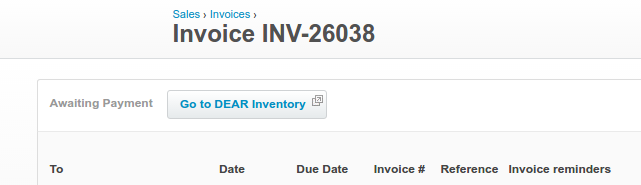
and of course, Cin7 Core lets you go the other way:
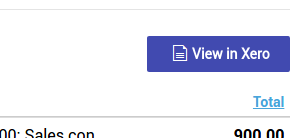
You can also jump from Xero’s contact page to the Customer/Supplier record in Cin7 Core.
Cin7 Core has very good tracking category integration with Xero. See below.
Cin7 Core lets you assign products to different revenue and COGS accounts. You can also assign sales accounts at customer level, and you can even give customers distinct AR accounts. However, you can’t choose to have both products and customers determining revenue accounts: Cin7 Core doesn’t have rules to deal with conflicts, so it’s one or the other. The flexibility is good.
The QuickBooks integration doesn’t have these ‘jump buttons’ allowing you to go back and forward between documents.
Cin7 Core, Cin7 Omni, Unleashed have Tracking Category integration with Xero, a very powerful reporting feature
If you want profit and loss reporting breakdown into “divisions” of your business, such as the P&L at a location (Sydney, New Zealand) or by channel (Retail, Wholesale), this will be very attractive.
Xero lets you add one or two extra dimensions to the chart of accounts. These are commonly called sub-accounts but for some reason, Xero calls them Tracking Categories. Quickbooks Online has something similar, called Classes.
In practical terms, it means that when you code something to Xero, you must choose an account, of course, such as Retail Sales. If you have a tracking category called ‘location’, you would then have the chance to enter “Brisbane”, say (unlike the GL Account, you may leave the tracking categories empty). When you run your P&L, all sales are consolidated by account, so all your Retail Sales total, be they from Brisbane or Melbourne. But you can also run P&L limited to a certain selection of Locations: You could make a P&L just for Brisbane, for example. This means you need to code other costs per location, such as rent, but there is no setup. You don’t need to make lots of GL accounts such as “Rent Melbourne” and “Rent Brisbane”. Every time you enter any item that needs an account, you have a field next to it where you can enter a location.
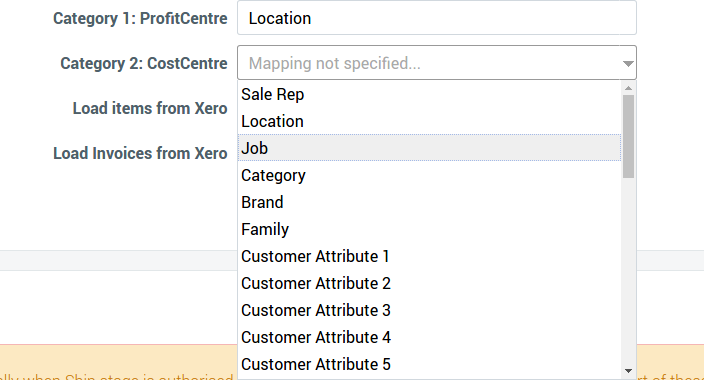
The Cin7 Core implementation is the best; that is, it offers the most customisation and the most links to objects, such as Sales Rep/Channel, warehouse, custom fields, product categories and a few others (see screen shot below). It is sensibly designed. Cin7 Omni’s implementation is not easy to set up and I have experienced significant bugs: orders coming through integrated channels don’t get mapped to tracking categories, which really cripples the usefulness. I have reported this bug.
The screen shot below from Xero shows an example, from an invoice. Here, we have two tracking categories, one for ‘profit centre’ and the second one for ‘Cost Centre’ (such as marketing). You can enter budgets per tracking category in Xero.
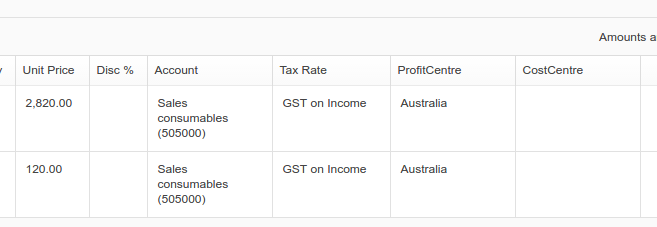
That’s all very nice, but how to avoid doing all that coding? Cin7 Core lets you map a wide range of fields to particular Xero tracking categories. A very common one is to map the location of sale (e.g. Brisbane) to the location or profit centre tracking category. But you can also map many other fields. It is a very powerful feature.
Unleashed has started offering mapping to tracking categories in late 2018. Cin7 Omni lets you map locations. Trade Gecko has some capabilities recently, which I have not investigated yet.
Below is an example of the mapping capabilities of the Cin7 Core / Xero integration between Xero’s tracking categories and Cin7 Core entities. Customer Attributes are a set of custom fields. The list is bigger than the screen shot shows. It also includes custom fields from products and on the order itself. This really is a very interesting feature of the Cin7 Core / Xero combination.
Performance and Stability
All these cloud systems are innovating with new features being deployed. Xero and Cin7 Core do this very well with good quality control.
The ‘weak link’ in performance and stability is Xero, not the ERPs. The ERP solutions are quite robust. Cin7 Core, for example, easily handles orders with 220 lines.
For very high volume clients, Cin7 Core has three dedicated server plans. If your order volume is above 500 a day you may find this attractive. There is no API limit on such plans.
Xero has for a long time mentioned transaction limits which seem very low, such as 1000 invoices a month. The story of Xero and its transaction limits has been confusing and unclear. Xero won’t give a simple answer, but there are reasons for this: an invoice of 100 lines is more complex than an invoice of 1 line. Unleashed/Cin7 Core take a lot of load from Xero and create non-inventory invoices, which should be some advantage. Wholesalers are likely to be well under the 5000 customer “limit”. On the other hand, businesses which are B2C and which therefore potentially deal with higher customer and transaction volumes should consider consolidation techniques as a backup plan in case the load gets too high for Xero. Xero talks about ‘1000 invoices a month’ but these are not hard limits; accounts are not terminated or processing stopped when these ‘limits’ are reached.
GrowthPath conducts real stress tests on Xero to see how it actually performs in a controlled environment. The first test results are now published and the conclusions are positive. We found that Xero delivers good performance at transaction volumes well above the published ‘limitations’, although it has important bugs with simultaneous order entry.
Unleashed, Cin7 Core and friends handle large volumes quite well. The weakest link for high transaction businesses will be Xero, but it performs better than you may think. Xero does have hard limits on API calls, which have been increased very significantly in 2017. In practice, GrowthPath rarely hears complaints from clients about the performance of any of these systems. Cin7 Omni has the most well-thought-out approach to avoiding high transaction load in Xero via consolidation options. The other packages have some options for this, particularly around B2C channels and POS.
Two-factor Login, SSO with Google and Office 365: Comparison
Higher security feature.
| Cin7 Omni | Cin7 Core | Trade Gecko | Unleashed | |
|---|---|---|---|---|
| Two-factor Login | No | Yes | No | No |
| SSO With Google | No | Yes | Yes | No |
| SSO Office 365 | No | No | No | No |
Mobile Apps
Unleashed has an Android app for basic sales entry.
The other platforms have mobile optimised POS apps which are close to the same thing. A mobile app should in principle be a better experience, but there is not much difference, as long as the web-based POS has offline capabilities, which they all do.
Cin7 Core uses an Android app for its WMS system, where Cin7 Omni uses a mobile-friendly web app. The Cin7 Omni approach is much more flexible; the Cin7 Core approach forces you to use specific and expensive scanners. However, they are good scanners.
Permissions, Approvals, Audit trail and Workflow
Cin7 Core
Role-based security settings, can combine multiple roles. This is good: role-based security is much faster to set up for new users, so you are more likely to use security profiles, and you are much less likely to make mistakes. Each point is no-access, read and update.
Each role is a combination of about 150 permissions. Users can be denied access to margins. Price list over-ride can be blocked. Credit-limit over-ride can be blocked. Locations are a permission setting.
Sale and Purchase order creation is a separate permission to authorisation.
Most transactions have good history of which user did what, and what financial journals were created by the transaction.
Cin7 Omni
Cin7 Omni has good permissions, but it does not have roles. Locations are controllable per user. Price tiers can also be restricted. Cin7 Omni does not have as many points as Cin7 Core, but it distinguishes between Standard and Manager, as well as Read Only. This is a more obscure: what exactly is the difference between Manager and Standard access for a Sales Order? It’s a decent permissions module, but not as good as Cin7 Core.
Unleashed:
Unleashed does not show document modification history, nor does it have an audit report.
Unleashed has role-based permissions and they are quite detailed.
Custom Fields and tagging
If the ERP is going to be useful as a source of master data, custom fields are important.
Tags are a highly useful way of adding information to master data; things which can be tagged can be grouped in non-hierarchical ways.
| Cin7 Omni | Cin7 Core | Trade Gecko | Unleashed | ||
|---|---|---|---|---|---|
| Custom Fields | Customers, Products, Suppliers, Branches | Customers, Products, Suppliers, Sales Orders, Purchase Orders | Products | ||
| Tags | No | Customers, Products, | Products | No | |
| Named ship-to addresses | Yes | No | Yes | ||
| Mandatory custom fields | No | No | Yes |
Cin7 Core allows a set of ten custom fields to these objects: products, customers, suppliers, sales orders and purchase orders. The custom fields can be free text, a checkbox, or a selection from a predefined list. The custom fields are well supported in the API and the reporting module. The sets can be independent: one set for customers, one for suppliers etc.
Unleashed is just phasing in custom fields. You can define them for products and they can optionally be made compulsory (unlike Cin7 Core). At present (June 2017) they are not very well supported by reporting but obviously, this will come. The API supports them.
Cin7 Core also lets you add tags to some objects: Customers and Products. Tags are a very handy way of grouping things together without needing a hierarchy. Unleashed does not have tags.
Cin7 Omni has some support for custom fields, but not consistently across all the objects. Cin7 Core is the winner overall in the category of custom fields and tags.
Tags can be added via a custom field. Cin7 Core has good support for tags built in to the system; they are used for selecting a group of products or customers in various places, such as advanced pricing. Using a custom field won’t deliver such nice features.
Pricing and Price Rule Feature Comparison Cin7 Omni, Cin7 Core, Unleashed
Pricing can get complex.
All these products handle multi-currency, GST inclusive and exclusive pricing, multiple price lists and discounts.
Advanced features such as quantity breaks, customer pricing per product and expiry dates on price rules are mostly handled.
Auto calculation of shipping pricing is too varied to summarise in a table.
Here is an article discussing what Cin7 Core offers. Unleashed and Cin7 Omni are roughly similar.
Do not underestimate your pricing requirements; the capabilities of the Cloud ERPs have improved a lot since 2017, but there may still be significant gaps.
Supplier-side pricing is not as sophisticated in any of the systems, and it is not covered here.
A “Pricing Matrix” means the ability to apply a rule to an intersection of certain products (could be all) and certain customers (could be all).
There are different ways to do this, and the capabilities of each system are quite different. If a product has any ability to apply pricing rules by customer or product groups, I give it “yes”.
Cin7 Core has good capabilities: products can be identified by sku, category or tag, and customers can be grouped by tag. Rules can also have a date dimension, and pricing can also be triggered by quantity levels. There is some product bundling as well. However, there was no API support or CSV import functionality until October 2021, so the module was crippled by the need for manual entry. With API support, this module is more feasible for more complex accounts. This is actually quite exciting, since it is by far the best pricing module.
| Cin7 Omni | Cin7 Core | Unleashed | |
|---|---|---|---|
| Nbr Price Lists | Many | 10 | 10 |
| Price Tiers are currency aware and convert currencies if needed | Yes | No | |
| Customer discounts | Yes | Yes | Yes |
| Markup pricing | Yes | Yes | Yes |
| Quantity Breaks | Yes | Yes | Yes |
| Customer pricing per customer | Yes | Yes | Yes |
| Price matrix (rule by product groups and customer groups) | Yes | Yes | Yes |
| Enforced pricing permissions (must take price list) | Yes | Yes | |
| Time-based pricing rules (promotions) | Yes | Yes | No |
| Bundled pricing | No |
Inventory Control: Batches, Serial Numbers, Expiry Dates
| Cin7 Omni | Cin7 Core | Trade Gecko | Unleashed | |
|---|---|---|---|---|
| Batch tracking | Yes | Yes | Yes | Yes |
| Serial number tracking | Yes | Yes | Yes | Yes |
| Expiry date | Yes | Yes | Yes | Yes |
| Alternate UOM | Yes | Yes | No | No |
| UPC Barcode Generation | Yes | No | No | No |
| SKU number generation | Yes | Yes |
The table above is the crude functionality. If batch and expiry date tracking is important, you should test how each system handles suggested picking: does it automatically suggest picking the oldest batch? How do you over-ride this?
Alternate UOMs allow you to specify codes in different packaging configurations, such as boxes of 12 and individual units. The definition of alternate units of measure must also include conversion.
A workaround is available for systems that don’t have direct support: you can define an auto-assembly BOM.
Product Costing, Margin Accuracy and Landed Costs
Stock is valued according to how much you paid to have it received (ignore manufactured stock for the moment). Therefore, stock value is a combination of the price paid to your supplier, and any third party costs, such as duty, clearance and freight forwarding costs. These systems all use perpetual costing. You can read more about perpetual vs periodic costing here. That article also has some background on what landed costs are.
Stock is always valued in the base currency.
Cin7 Core, Unleashed and Cin7 Omni use FIFO costing (First In First Out): it remembers the cost associated with each receipt and uses that when calculating the cost of goods shipped. If the stock in hand is based on multiple receipts, it uses the oldest stock first (the First In). This is a more advanced costing approach than weighted average, although over the long run they are the same. Older systems use average costing, but if you need a system which does costing per batch or per serial number, you need to cost using transaction history. All these systems do that, so they offer FIFO instead of average costing in the general cost.
None of these systems use standard costing, so there are no variance accounts, although there is some version of this for overhead components in assembled products in Cin7 Core and Unleashed.
The systems increasingly track costs per warehouse; when they don’t, batch costing is a workaround. Cin7 Core does track costs per warehouse even without using batch control, and its landed cost functionality is extended to stock transfers, so you can increase the cost of stock during a transfer by allocating a service invoice (for freight, for instance). Cin7 Core continues to have a clear lead in its costing functionality: it is the most advanced (with the exception of Cin7 Omni’s flexibility to allocate landed costs by volume) and it is the most reliable.
Landed Costs and other allocations of non-stock-supplier costs into inventory value
Landed costing is allocating third party costs to stock. Usually this is freight forwarding, duties and other costs associated with clearing imported items, but the general idea is to add a service cost to a stock item, even when the service cost invoice is not from the stock supplier. It makes gross margins more accurate.
Cin7 Core, Cin7 Omni and Unleashed do landed costing. Cin7 Core has the best, although Cin7 Omni and Cin7 Core both have exclusive features.
Cin7 Core’s landed cost system is very good and Cin7 Core’s inventory valuation basis is consistent with the journals it sends to Xero. Cin7 Omni handles non-bom costs by basically simulating their effect on inventory value, it is confusing. That is, it does not really pass landed costs through to Xero. It assumes you book them in Xero as expenses, so they are not capitalised properly.
Cin7 Core allows the same logic of landed cost to work with manufacturing jobs, which opens up more complex contract manufacturing accounting, in case the standard approach of BOM-based service costs is not adequate.
Cin7 Core also allows landed costs to be allocated to transfers between warehouses, which is unique to Cin7 Core.
Both Cin7 Core and Cin7 Omni allow you to allocate an expense across multiple POs (costs associated with a container or consolidated shipment can be allocated across all the POs in the shipment).
Cin7 Core does retrospective landed costing: you can receive and ship goods, generating the COGS, and then later apply the landed costs: it retrospectively updates Xero. Unleashed offers this too.
Cin7 Omni does not actually push landed costs into true stock value, that is, the landed cost component of stock value is not sent to Xero and does not form part of COGS.
Allocation methods
Cin7 Omni has three landed cost allocation algorithms: value, mass and volume. In August 2020, Cin7 Core has begun offering allocation by mass and volume, but so far only for service costs on the supplier PO. For other landed costs, currently it is only done by weight value, although I expect this to change now that volume and mass allocation exists in Cin7 Core’s logic.
However, compared with Cin7 Omni, Cin7 Core actually absorbs (capitalises) landed costs to inventory valuation. It is a better solution, as I describe here:
Note that Cin7 Core is a very pure implementation of landed costing from the accountant’s perspective. It capitalises landed costs into inventory (“absorbs” them) and makes the necessary adjustments to Xero. This is a textbook approach. Cin7 Omni is not as pure. It keeps two stock values: one it sends to Xero, and one it uses for its margin reporting. It does not capitalise landed costs into its accounting stock value, so the COGS journals Cin7 Omni sends to the accounting back-end do not include landed costs. Cin7 Omni assumes you have booked those invoices into Xero, and lets them simply appear in your gross margin in the month the landed cost invoices are booked, courtesy of your accounting package. However, it “simulates” the true landed cost for its margin reporting. As an accountant with a lot of manufacturing experience, I prefer Cin7 Core’s approach, since there is only one definition of cost price, plus it gets the timing correct: landed costs appear in your P&L when you sell the related stock. With Cin7 Omni, you can get timing problems, since you may well see the landed costs in Xero before you sell the product. This is unfortunate for accuracy, and it for sure means the GM reported in Cin7 Omni won’t agree with Xero.
Note: it is possible with all the ERPs to not use Perpetual Inventory by disabling COGS exports. You then revert to a Periodic costing method. This is not a very good idea, but it is possible.
Manufacturing and Assembly Costs
* Cin7 Core now has a full manufacturing module, with routing and capacity planning. I have not updated this article to refer to this. This capability is in a different league to the manufacturing capabilities of rival products. Cin7 Core has maintained its “assembly” manufacturing module, which is what I refer to here. The “Assembly” functionality is focused mostly on getting reasonably accurate costs, without any support for shop-floor process steps or controls.
The systems considered here support a ‘backflush’ approach to costing. You provide a Bill of Materials, and when you receive the finished product into stock, the costing is done. This approach suits repetitive manufacturing, where a consistent recipe is used. During production, WIP accounting is used.
During the process of manufacturing, you may have less than perfect yield, and you may want to absorb non-stock costs into the finished product, such as sub-contractor costs, materials which you don’t stock such as glue and packaging, and so on.
Cin7 Core offers a better solution than Unleashed because you can directly include non-stock items (with costs) into the BOM (that is, overhead costs can be allocated into the cost price via the BOM).
Cin7 Core, Cin7 Omni and Unleashed allow you to record yields and to make variations to the BOM.
Cin7 Omni lets you add non-stock costs to the BOM, but it does not actually include them in the COGS journals sent to Xero; it assumes these costs are already in your P&L.
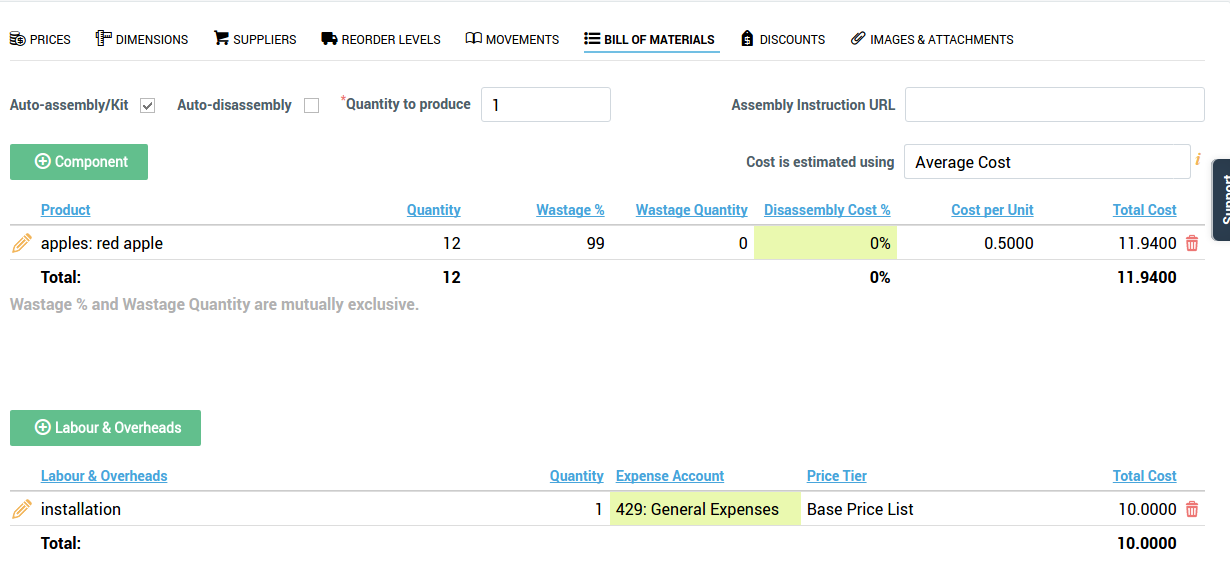
Below is a contrived BOM showing an auto-assembled item in Cin7 Core with both wastage and a non-stock component added to the cost.
Contract Manufacturing
Cin7 Omni has for a long time supported a contract manufacturing workflow, which is a set of instructions to use the existing features of BOMs and landed costs.
Cin7 Core had documentation but it was very clunky. In August 2020 Cin7 Core introduced a specific contract manufacturing feature in its enhanced manufacturing model, which includes capacity planning. Contract manufacturing can be treated as a work centre, that is, it can be treated as a step in the manufacturing process.
Job Costing / WIP Accounting
Cin7 Core also has a Job Costing module, which lets you assign ad-hoc costs and products to jobs. You could use this for make to order work if the process is long-running and you want to use Work-in-Progress (WIP) costing. Unleashed doesn’t have this feature. Having said that, a standard repetitive production process in Cin7 Core goes through a pick process which takes component stock out and transfers it to WIP. Unleashed doesn’t do this either (I think).
Cin7 Omni lets an order get a Project Code; this is basically a tag. We can do this in Cin7 Core too, via a custom field added to the Sales Order header.
As mentioned above, you can apply landed logic to assembly jobs in Cin7 Core, using the same method as with stock receipts.
To repeat, in 2020 Cin7 Core introduced a real manufacturing module which is a much more sophisticated alternative to the “assembly” modules here.
Documents (invoices, pick lists etc)
Documents and Forms are the most likely part of the system which need tweaking.
Both these systems make this feasible for end-users.
Cin7 Core follows the Xero approach of treating form design as a mail merge exercise in MS Word. This is powerful and very flexible, but you need to be comfortable with Word Mail Merge. Overall, I’ll score this as an A because it’s flexible, quite easy and the same approach as Xero. However, in its Automation module, it’s possible to send emails, and these use a basic web-based template editor, not the Mail Merge approach. The mail-merge approach is not very user friendly and it should go away.
I give Unleashed somewhere between a C+ and a B. These don’t use mail merge; rather, they have simple editors. Unleashed’s is actually quite nice. Cin7 Omni is basic, and advanced layouts will need the assistance of Cin7 Omni staff.
Reporting
I am disappointed by the reporting, particularly in Unleashed. It is minimal and not customisable. A proper exploitation of Unleashed + Xero will require the use of a third party reporting solution which is fed transactional data from Unleashed. For day to day operations, the reporting is adequate. GrowthPath’s more advanced clients have a data warehouse/BI solution; my recommended solution is Zoho Analytics, and GrowthPath clients can take advantage of our existing connectors.
All the ERPs are improving their reporting. The key problem for a modern business is that the ERP only has some of the vital data to the business: it’s nice to have Cin7 Core’s highly accurate margins, but it doesn’t include your AdWords spend.
Backorder Management
Backorders mean different things to different businesses. Cin7 Core supports the most flexible approach to multiple fulfilments of orders, Unleashed is a close second and Cin7 Omni relies on order splitting (which is an option in the other two). However, while Cin7 Omni has less flexibility, it does its one way of working really well, with a lot of information available at once. Cin7 Core and Unleashed have been slow to support easy backorder visibility for customers and people who looked at these systems before 2018 could easily have been disappointed. There have been improvements, in the case of Cin7 Core big improvements, but this is a really important area to evaluate when choosing a system. Cin7 Core still has reporting weaknesses with backorders. It lacks an easy way to see an overview of an order, what’s been shipped and what’s on backorder, and when it will be available.
Reservation of Stock and incoming stock to specific customer orders
This is not very well supported by any of the packages. However, Cin7 Omni is evolving a solution to this, with ‘holding stock’. For high-value, long-lead time businesses (such as furniture) this is important.
Drop shipments/cross docking, Consignment stock
The three systems have drop shipping as an option. Cross docking needs to be handled either as a dedicated warehouse or as a drop-shipment.
Cin7 Omni has specific consignment stock management; the other two require use of a dummy warehouse (which is workable but could be better).
Multiple currencies: Very good
The three systems when connected to Xero handle multicurrency very well. The ERP systems will send invoices through to Xero in the customer’s currency, and Xero looks after foreign currency customers and suppliers quite well, keeping the open AR items in the customer’s currency (same with suppliers, of course). So this is a genuine multicurrency situation. Xero is a single ledger system and therefore supports only one tax regime, so if you need to pay taxes in a foreign country, some workarounds are necessary. You can enter payments in Cin7 Core, and this works as you would expect, respecting the currency of the payment.
Multiple Units of Measure
Cin7 Omni does this very well, natively. Cin7 Core has recently improved its offering to be acceptable.
Warehouse Management
Warehouse management means mobile support for barcoded operations, bin locations. The ERPs do this in the normal backend: warehouse management means specific mobile friendly solutions, including offline support in case warehouse wifi coverage is not all it should be.
Cin7 Omni was the innovator here, and has the most mature solution.
Cin7 Core launched a “WMS” (Warehouse management module) in 2018. It requires dedicated scanners which run Android. They are expensive, but looking on the bright side, cheap scanners are often bad news.
Warehouse management also includes bin locations, pick zones, transfers etc. There is varying support for these features, and there is steady enhancement. For instance, in 2016 stock transfers in Cin7 Core were very basic: locations did not even have address information, so there was no chance of generating useful paperwork.
Now, locations have addresses and stock can be placed in transit with separate dispatch and arrival dates; it is pretty complete. Cin7 Omni already did this. Neither of them makes it easy to process differences in dispatch and received quantity, which is a weakness.
There is still a gap between these products and specialised warehouse management systems. The good news is that there is some support emerging in Cin7 Core and Cin7 Omni for optimised pick runs. The pace of change is slow, I don’t think that WMS gets much attention from the ERP vendors.
POS
POS is a big topic for modern retailers. It can include promotion and customer loyalty functionality, marketing and omni-channel fulfilment. The best POS is provided by dedicated solutions, such as Vend or Kounta, and I do not see that the ERPs will close the gap.
However, the Cin7 Core and Cin7 Omni POS offers are certainly not the joke they were when first launched. They can get the job done. They lack the advanced retail features and integrations of the leading cloud POS providers. However, they offer more advanced logistics integrations; Shopify orders can be routed for in-store pick, for instance, and staff can easily see stock at other locations. My feeling is that for businesses that live and die by their POS experience, the best path is to use a best-of-breed approach and write a custom integration to the ERP to add missing features. For businesses that need a POS to manage retail transactions efficiently but don’t need the latest customer loyalty apps and advanced promotional features, the POS offers of Cin7 Core and Cin7 Omni are so easy to set up they are worth considering.
Hardware requirements for scanners and printers need careful attention.
The POS offers of Cin7 Core and Cin7 Omni are evolving quite fast. But no one loves them, at best the shortcomings are regarded as acceptable tradeoffs for businesses which place a high value on integration with the ERP.
B2B Portal
Cin7 Core, Unleashed and Cin7 Omni all have basic B2B portals.
A B2B portal is for wholesale customers. It’s different from a B2C portal because it should have features for bulk ordering, it should have invitation control, and you should be able to use the full power of the ERP’s pricing logic, such as customer-specific pricing and quantity breaks. B2B customers are much more likely than B2C customers to make use of order history when placing new orders, so that’s important.
The B2B portals offered by the three ERPs are pretty similar, to be honest. They do the basics well, they are pretty cheap, and they are not very customisable. Cin7 Omni for a long time had its B2B as a point of difference, Cin7 Core launched its first version about three years ago, and now Unleashed offers one too. I don’t see a huge amount of innovation, but hopefully with all three targeting this feature, we will see some improvements. Unleashed is offering some marketing automation features, which is thinking differently; Cin7 Core and Cin7 Omni have not ventured into this type of added-value.
Notes about EDI and 3PL integrations: A big win for Cin7 Omni.
Cin7 Omni will build 3PL integrations as part of its offer. It can work with either FTP or REST file transfer options: it depends on what your 3PL wants. This is a good feature and it is quite mature in Cin7 Omni.
Cin7 Core and Unleashed do not do this natively, but there is a good, mature third party EDI solution (Crossfire). Good 3PLs will have EDI support, even if messages are communicated with file transfer, so Crossfire can be used for 3PL integration. Crossfire will also support 3PL integrations with flat file and API interfaces. The monthly service costs can be high.
So this is an advantage to Cin7 Omni, but it may not be decisive.
There are third party solutions for Cin7 Core 3PL integration. One of them is GrowthPath’s advanced 3PL interface, which is suited for businesses wanting a very featured 3PL integration with custom features, such as tight control over batch/serial numbers, automated stock level sync and some advanced invoicing features. The Crossfire EDI product can be used for 3PL integration, providing a managed solution which is very well supported.
Barcode Support
See notes on warehouse management and POS.
Specific notes about Cin7 Core and Cin7 Omni Shopify Integration
Cin7 Core and Cin7 Omni both have supported integrations with Shopify. Cin7 Omni’s is more advanced: it offers more flexibility over importing, and it is clearer about product mapping. Cin7 Omni also has a demand-based response to how often it fetches, busy sites can expect a sync every 7 minutes. Cin7 Omni supported Shopify’s new multiple location feature even while Shopify still has it in beta, which is a big statement about how committed Cin7 Omni is to the interface.
Cin7 Core has the advantage of payments flowing though to Cin7 Core and then to Xero; Cin7 Omni doesn’t sync payments … but Cin7 Omni has better batching options to buffer Xero from high transaction volumes. They both do multiple stores.
Both work well with Shopify, but Cin7 Omni is superior overall.
Cin7 Omni also has a bigger collection of e-commerce integrations.
Specific notes about Neto integration
Cin7 Omni has a good Neto integration. Cin7 Core has abandoned this integration.
Integration (3PLs), API and Workflow
For integration, cloud systems support
- pre-packaged integrations
- third-party integrations
- Zapier pre-configured transactions
- Do it yourself via APIs
APIs let you write “macros”, that is, you can script the API to tell you things (e.g. stock levels) or to automate things (create this production order).
A huge advantage of good cloud software is the API, which lets a programmer familiar with basic modern techniques get access to the underlying transactional data. From there, all kinds of new insights and efficiencies are “unleashed”. Xero has a good API. Unleashed and Cin7 Core both have APIs which have gaps, but they are quite good. Cin7 Core’s is more modern but it doesn’t matter much. Cin7 Core rolled out V2 of its API in early 2018. It’s a big step forward and it is clearly the best API of its competitors, including Cin7 Omni. Since the roll-out of V2, Cin7 Core has taken another huge leap with “web-hooks”. Traditional APIs require a third-party app to “poll” the ERP (do you have any new orders? Then five minutes later, Do you have any new orders? and so on). With webhooks, a third party can ask Cin7 Core to let it know when certain things happen. This allows much faster responses, and it has other advantages.
The other point is coverage: of all the things a user can do at the keyboard, how much of that can be done via the API? Xero is the gold standard. Cin7 Core is miles ahead of the ERP competitors, it is not even close, due to a consistent focus and investment. This is a huge advantage to Cin7 Core, even though it may not be immediately apparent.
GrowthPath has built a number of advanced integrations into these systems.
Detailed comparison of API capabilities
We have a detailed comparison of API capabilities, which highlights how far ahead Cin7 Core is.
Web-hooks, automated workflows and notifications: New powers for Cin7 Core
For Cin7 Core, there are some advanced features coming soon, such as web-hooks. These are ‘push’ events where Cin7 Core will tell other applications that something has happened (such as an order arriving or being shipped). At the moment, applications need to repetitively ask for updates. Cin7 Core already has a user-facing implementation of these ‘push-events’ in the Notifications module, launched in 2018. This may not sound very exciting, but it is a very big step. For businesses using Cin7 Core, notifications mean a workflow system. For API developers, it means much better integration possibilities. Cin7 Core will use Notifications to offer a Zapier module. Zapier is a “user-friendly” zero-programming API tool for connecting applications.
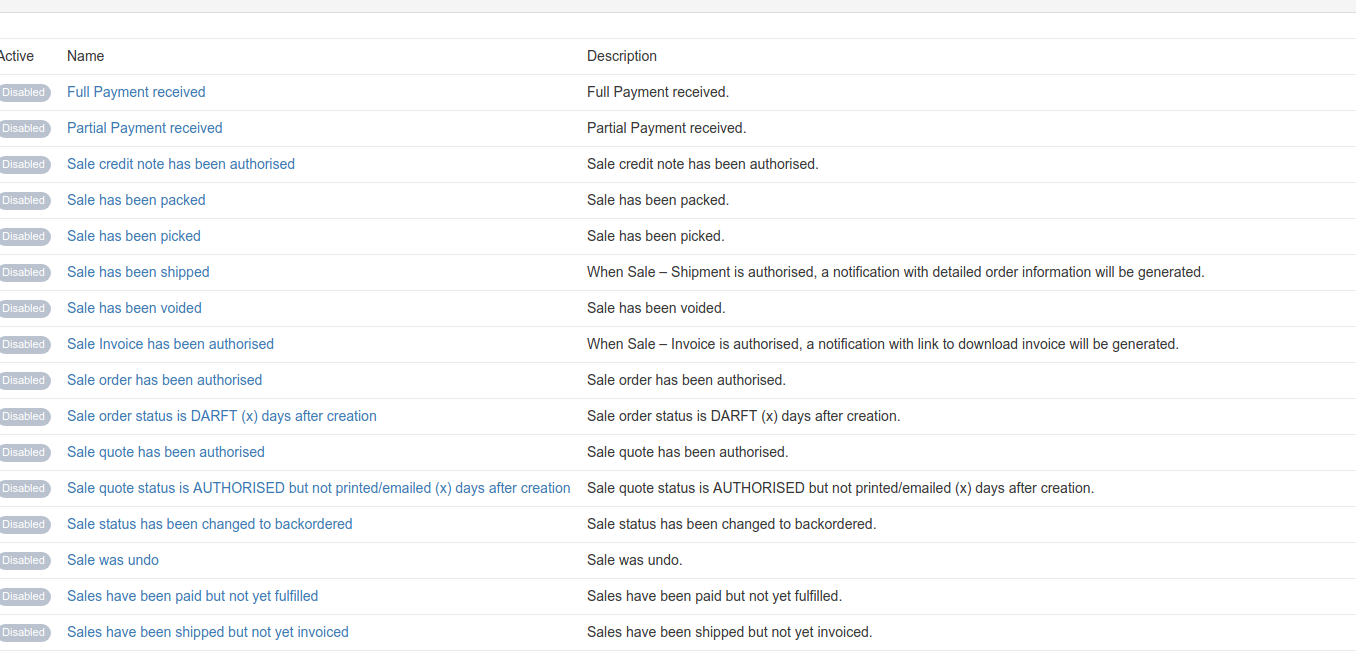
The screenshot below shows some of the events which are supported by Cin7 Core’s notification module. Any of these events can cause an email update (to staff, suppliers or customers), or an internal notification. This is just the beginning of what will happen with this emerging capability.
Cin7 Omni has announced an internal automation feature, which I have not yet investigated.
Alternatives
Cloud-based supply chain systems for smaller businesses are an emerging market. Traditionally, businesses would be looking at monolithic ERP systems hosted on in-house servers, using Windows desktops. For cloud systems, I can name TradeGecko, Stitch, Cin7 Omni and Cin7 Core as competitors to Unleashed.
TradeGecko has a great API and it supports tags, but its decision to handle customer payments is awkward, and its backorder support is not good enough for wholesalers. However, it has some areas of real strength and I’ll be keeping an eye on it.
Cin7 Core has made some very interesting progress and in Q4 2015 it is now a very serious competitor, possibly even the leading choice. Firstly, it released a good, modern API in 2015. Secondly, its Xero interface is substantially more powerful than competitors. One feature which is very compelling is the ability to map attributes to Xero tracking categories. For example, if a business has different locations and wanted to run a P&L for each location, you would set up a Xero tracking category (or QuickBooks class). In Unleashed, each invoice belongs to a location. You set up the interface to map an Unleashed location to a Xero category, and automatically the sales and COGS go to the right P&L. This is an advanced feature. Cin7 Core also offers two-way payment sync.
There are ‘cloud’ versions of monolithic packages competing in this market. Many traditional ERPs will not survive the move to the cloud, but some with big backers are becoming hosted solutions, which I call “cloud look-a-likes”. These are browser-based versions of the traditional approach: everything in one system. They tend not to offer APIs since behind the scenes they are reusing older code. They offer better traditional functionality, more complexity, less integration. Pricing is per month per seat, and you don’t need to bring a server. They are cloud packages in the sense of being software-as-a-service, but they are not based on a “best of breed” approach and open integration, which I call “pure cloud”.
The decision to go with a traditional or hosted system could be based on the superior functionality. The more your business depends on services, differentiation, and complex sales cycles, the less advantage the traditional systems will have because you will be trapped by their compromises and lack of flexibility, but the more traditional your business is (make and sell something), the more appealing you may find the traditional approach.
The culture of your business is an important consideration. Simple systems are easier to recruit for and easier to introduce to a business which has been relying on low-tech, ad-hoc approaches. Powerful tools demand more from the day to day users of the system: the coding decisions required when entering a sales order can be much more demanding, for example.
Cin7 Omni is a different beast, being larger in scope but more expensive.
The ‘online shop’ alternative (e.g. Neto)
The sales channels of medium-sized wholesale businesses are transforming. The facility to take wholesale orders, remote rep orders and online market-place orders are becoming more important. It turns out that this opportunity has been noticed by online stores. Neto, for example, provides a lot of wholesale functionality, including good pricing support (better than Unleashed), multi-warehouse, integration with third-party pick and pack, good mobile support. It even has some serial number support. It doesn’t do manufacturing and the purchasing and costing functionality is not as good as Unleashed, but its e-commerce support may be more than enough compensation for some wholesalers. Neto is Australian, and in June 2015 Telstra announced that it had taken a substantial shareholding.
Neto now has an ERP-lite backend. It is however still immature with a small feature set; it cannot be considered a competitor to the systems discussed here. Meanwhile, Cin7 Core and Cin7 Omni have POS & B2B solutions. Cin7 Core is ready for use and developing fairly fast. Unleashed now has an emerging B2B offer, but this reinforces the perception that Unleashed is playing catch-up.